
Every home care agency has a version of the same Monday ritual. A coordinator sits down with a list of clients, a list of carers, and a blank week, and starts fitting one to the other. Done well, the rota is invisible: visits happen on time, familiar faces turn up, carers finish their runs without racing across town. Done badly, it is the source of almost every complaint an agency receives, from missed calls to burnt-out staff.
The good news is that rota building is a craft with a learnable sequence. The order you work in matters more than any individual decision. Here is the sequence experienced coordinators follow, whether they work on a whiteboard, a spreadsheet, or purpose-built home care scheduling software.
The short answer: build a home care rota in a fixed order: visits first, geography second, people last. Start by listing every commissioned visit for the week from your care packages, with its time window, duration and required skills. Group those visits into geographic runs so each carer works one patch rather than criss-crossing town. Then assign carers, keeping the same faces with the same clients wherever you can, adding a second carer to every double-up call, and leaving realistic travel time between visits. Check each carer's total against their contracted hours before you sign anything off, and hold a little slack for sickness cover. A coordinator doing this by hand typically spends 4 to 6 hours a week on it; scheduling software such as homecareOS shortens that with recurring visit patterns, drag-and-drop assignment and conflict alerts, and its AI Rota Builder can generate a full optimised week in under 60 seconds.
Step 1: Start from care packages, not carers
The most common beginner mistake is starting with the staff list: "Karen works Monday to Friday, what shall I give her?" That approach produces a rota shaped around employment contracts rather than care needs, and the gaps only surface when a client rings to ask where their lunchtime call went.
Start instead with demand. Go through every active care package and write down each commissioned visit as its own line: the client, the days it happens, the earliest and latest acceptable start time, the duration, and anything the visit requires (medication support, moving and handling, a female carer, a specific qualification). A 30-client agency typically generates somewhere between 300 and 500 visit lines a week, which is why this list, not the staff list, is the real rota.
Two details are worth capturing properly at this stage. First, time windows: "8am call" usually means "between 7:30 and 8:30", and knowing the true tolerance gives you room to sequence runs. Second, dependencies: insulin before breakfast, warfarin at a fixed time, day centre pick-ups that cannot slip. Mark these as fixed points and treat everything else as movable around them.
Step 2: Group visits into geographic runs
Once you can see the whole week's demand, resist the urge to start assigning names. The next job is geography. Cluster visits that sit close together into runs: a sequence of calls one carer can realistically do back to back in one part of your patch.
A good run has three properties. The visits are near each other, so travel is minutes rather than half hours. The time windows chain sensibly, so a 45-minute call ending at 9:15 feeds a 9:30 start ten minutes away. And the run has a natural shape to the day: a morning block of get-up calls, a lunchtime cluster, teatime, then evening tuck-ins, matching how demand in domiciliary care actually bunches.
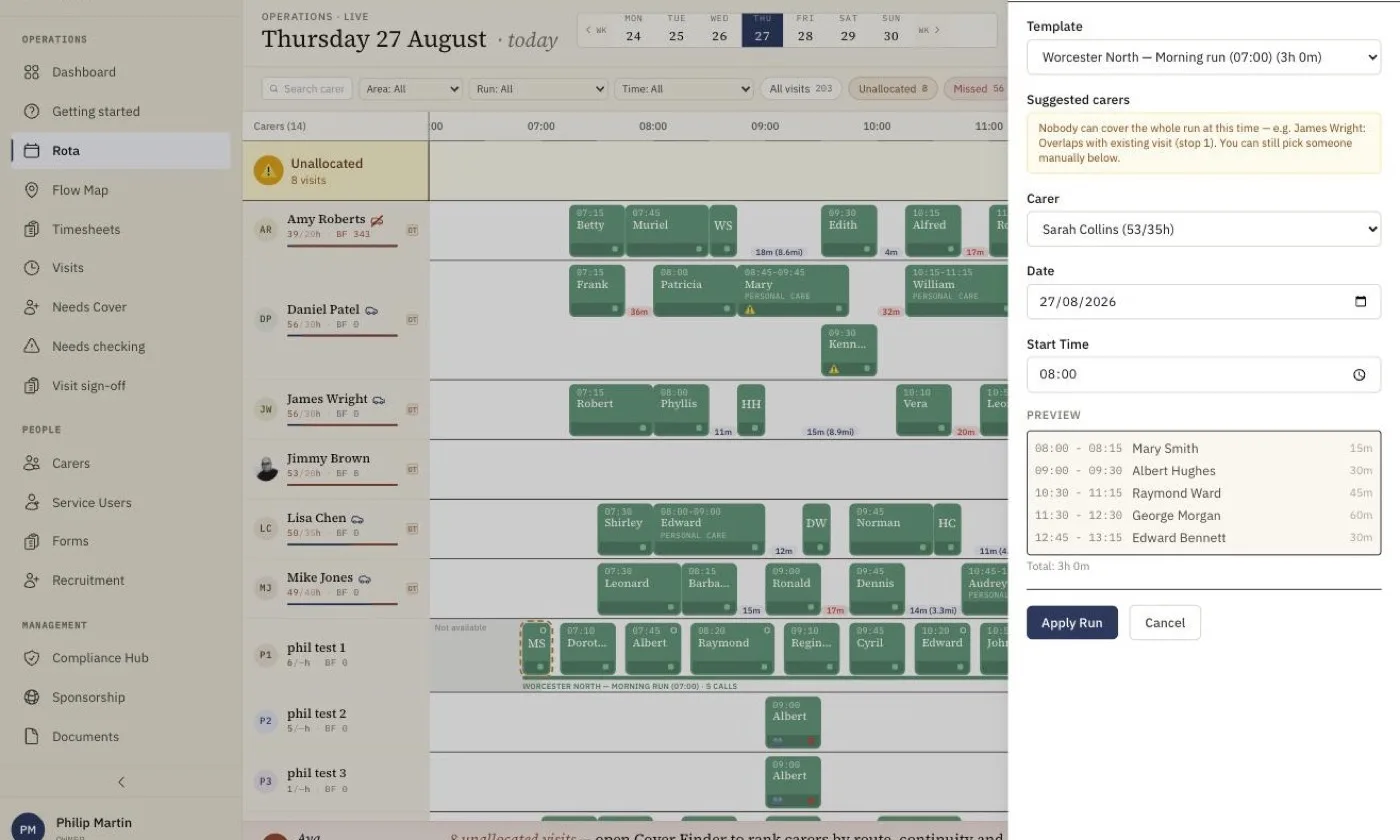
Runs are also your reusable asset. Most home care demand repeats weekly, so a run you design carefully once should be saved and reapplied, not rebuilt from scratch every Monday. This is exactly what run templates exist for in scheduling software, and it is the single biggest time-saver in the whole process.
Step 3: Assign carers, and protect continuity
Now, and only now, do people enter the picture. Match each run to a carer, and let one principle outrank the others: the same carers should visit the same clients, week after week.
Continuity is not sentimental. Familiar carers spot deterioration earlier because they know what normal looks like for that person. Clients with dementia are calmer with faces they recognise. Families complain less, regulators in all four UK nations look for it, and carers themselves prefer rounds where they know everyone on the list. Research links continuity of care to fewer avoidable hospital admissions, which is why it deserves to be weighted deliberately rather than left to chance.
In practice, protecting continuity means assigning each client a small named team of two or three carers rather than a single person (one carer alone breaks the moment they take a holiday), then keeping every visit inside that team wherever possible. When you must introduce someone new, plan it: a shadow visit alongside a familiar carer beats a stranger arriving unannounced.
Step 4: Schedule double-ups and specialing properly
Some visits need two carers at once: hoisted transfers, some complex personal care, certain behavioural support packages. These double-up calls are where hand-built rotas most often go wrong, because the visit has to appear in two people's schedules for exactly the same window, and both carers have to actually converge on the doorstep at the same time.
Schedule double-ups first within each time band, before single-handed calls, because they constrain two diaries at once. Pair carers whose runs pass near each other rather than dragging someone across the patch for one call. And be explicit about roles: on a well-run double-up one carer leads and the other supports, and on shadow or assessment visits the second person is there to observe, not to deliver hands-on care. The same discipline applies to specialing, the long one-to-one blocks some packages require, where a single carer stays with one client for hours at a time: block the whole period out honestly rather than pretending the carer is available for calls either side of it.
Step 5: Build in real travel time
A rota that reads 9:00 to 9:30 at one address and 9:30 to 10:00 at another is a work of fiction. Somebody is either leaving the first visit early or arriving at the second one late, every single day, and it is usually the client who pays in shortened calls.
Between every pair of consecutive visits, allow the actual door-to-door travel time for the mode of transport that carer uses, walking pace in a town centre is not driving pace on rural lanes, plus a small buffer for parking and handover. If you are working manually, a printed map of your patch with client locations marked is genuinely worth the hour it takes to make; unrealistic pairings jump out visually in a way a spreadsheet never shows.
Step 6: Check contracted hours and overtime before you publish
Before the rota goes out, total each carer's week and compare it against their contract. You are looking for problems in both directions. Overloading a carer past their contracted hours creates quiet, recurring overtime that erodes margins and burns people out; scheduling a guaranteed-hours carer short of their contract means paying for hours you never rostered.
Watch the legal limits too: rest breaks between a late finish and an early start, weekly working-time ceilings, and travel time counting as working time for most domiciliary carers. Uneven weeks also deserve attention. If one carer is at 42 hours and a colleague with the same contract is at 19, that imbalance will surface eventually, either as a resignation letter or as an overtime bill.
Step 7: Plan cover before you need it
The rota you publish on Friday is not the rota you will deliver. Someone will call in sick, a car will fail its MOT, a family emergency will land at 6:40am. The difference between a calm agency and a chaotic one is whether cover was planned as part of the build or improvised on the morning.
Practical cover planning means three things. Keep a little headroom: if every carer is rostered to their maximum, one absence collapses the day. Know your realistic cover pool for each run, meaning who else already knows those clients and holds the right skills, so absences route to familiar faces first. And watch absence patterns over time rather than reacting to each event in isolation. The measure UK agencies use for this is the Bradford Factor, which scores frequency of absence more heavily than duration, because five scattered single days disrupt a domiciliary rota far more than one ten-day bout of flu. A rising score is a prompt for a supportive conversation, and an early warning for your cover planning.
How software automates each of these steps
Everything above can be done on paper, and plenty of agencies still do. But each step has now been automated, and the time difference is dramatic. Here is how the sequence maps onto homecareOS scheduling:
- Care packages and patterns (Step 1): recurring visit patterns are set up once, daily, weekly or custom, and the system generates future visits automatically, so the demand list builds itself instead of being retyped every week.
- Runs and geography (Steps 2 and 5): run templates let you create a visit sequence once and apply it across weeks, while travel time intelligence factors real journey times between visits so carers are not rushed and clients are not kept waiting. A live visit map shows every carer and call across your patch.
- Assignment and continuity (Step 3): a visual drag-and-drop grid shows the whole day across every carer, with preferred-carer matching that prioritises familiar pairings and flags when a non-preferred carer is assigned.
- Double-ups and roles (Step 4): multi-carer visits are scheduled from a single visit card, with each attendee given a distinct role: lead, support, shadow or supervisor.
- Hours and conflicts (Step 6): conflict detection alerts you automatically when a carer is double-booked, scheduled outside their availability, or pushed over their contract hours, before the rota is published rather than after.
- Cover (Step 7): when someone goes on leave or calls in sick, their visits are instantly highlighted for reassignment, unallocated calls stand out in dark orange, and the cover finder suggests available carers one click away.
Then there is the step change beyond automation. The homecareOS AI Rota Builder, available on the Pro tier, runs the entire sequence in this guide in one pass: it scores each possible match on continuity, the skills the care plan calls for, language, gender preference, pets and genuine availability simultaneously, and generates a complete week's rota in under 60 seconds. Crucially, the coordinator stays in charge: every allocation can be dragged, dropped and overridden, so the AI does the heavy lifting and the human applies the judgement. Coordinators who build the same rota by hand typically spend 4 to 6 hours a week on it.
Bringing it together
A good home care rota is built in layers, in order: demand from care packages, geography into runs, people with continuity protected, double-ups locked in early, honest travel time, hours checked, and cover planned before it is needed. Follow the sequence and the rota mostly builds itself; skip a layer and you will spend the week paying for it in phone calls.
If you would rather see the whole sequence running inside real software, book a 20-minute demo and we will build a week live on a sample rota, or get started and try it with your own visits. Pricing is per carer: free while you have up to 5 carers, then £10 per carer per month on Pro, with the office team unmetered; details are on the pricing page. If the rota is only one of the jobs you are trying to solve, our complete guide to home care software covers the rest of the operational picture.