Home care reporting and KPIs
Fifteen built-in reports give you visibility into every corner of the operation, from visit performance and medication coverage to training gaps, pay rates and revenue by payer.
See Everything. Miss Nothing.
Live dashboards and ready-made reports replace hours of manual number-crunching. Whether you need a quick snapshot for your morning huddle or a detailed breakdown for your commissioner, homecareOS puts the right data in front of the right people at the right time, so you can act on insight, not instinct.
Reports That Drive Better Outcomes
Every report is designed to answer the questions that matter most to home care managers, coordinators, and commissioners.
Visit Reports
Completed, missed and cancelled visits, and how close each ran to its planned length. Set any date range, see utilisation carer by carer, and spot patterns before they become problems.
Compliance Reports
Training expiry, background check status, supervision schedules, incident summaries. Everything your registered manager needs at a glance.
Staff Performance
Hours worked, carer utilisation, travel time between calls and absence patterns, with the Bradford Factor calculated for you. Support your team with data, not assumptions.
Financial Reports
Revenue by payer, cost per visit, profit margins by service type. Understand your real profitability.
Service User Reports
Care plan reviews due, goal progress. Evidence outcomes for commissioners and families.
Equality Monitoring
Applied, interviewed, offered and hired, broken down by the protected characteristics your recruitment forms collect. Any cell with fewer than five people is suppressed, so nobody can be identified.
Comprehensive Reporting Suite
From real-time dashboards to commissioner-ready exports, every reporting tool has been built for the specific needs of UK home care.
Fifteen built-in reports
Grouped into operations, care quality, people and money, every one ready to run from day one with no report builder to learn first.
Date range presets, including the UK tax year
Slice a dated report by day, week, month, quarter, last twelve months or a range of your own. The tax year runs 6 April to 5 April as a single preset, so a payroll period is one click rather than two typed dates.
Export to CSV
Download any report as a CSV for further analysis in your own spreadsheets. The incidents report also produces a Quality and Safety pack as a PDF for sharing.
Automatic alerts running in the background
Missed visits, missed rounds, low staffing, care reviews falling due and overdue incident actions are checked on a schedule and sent to the right people, so nobody has to remember to go looking.
Live dashboard KPIs
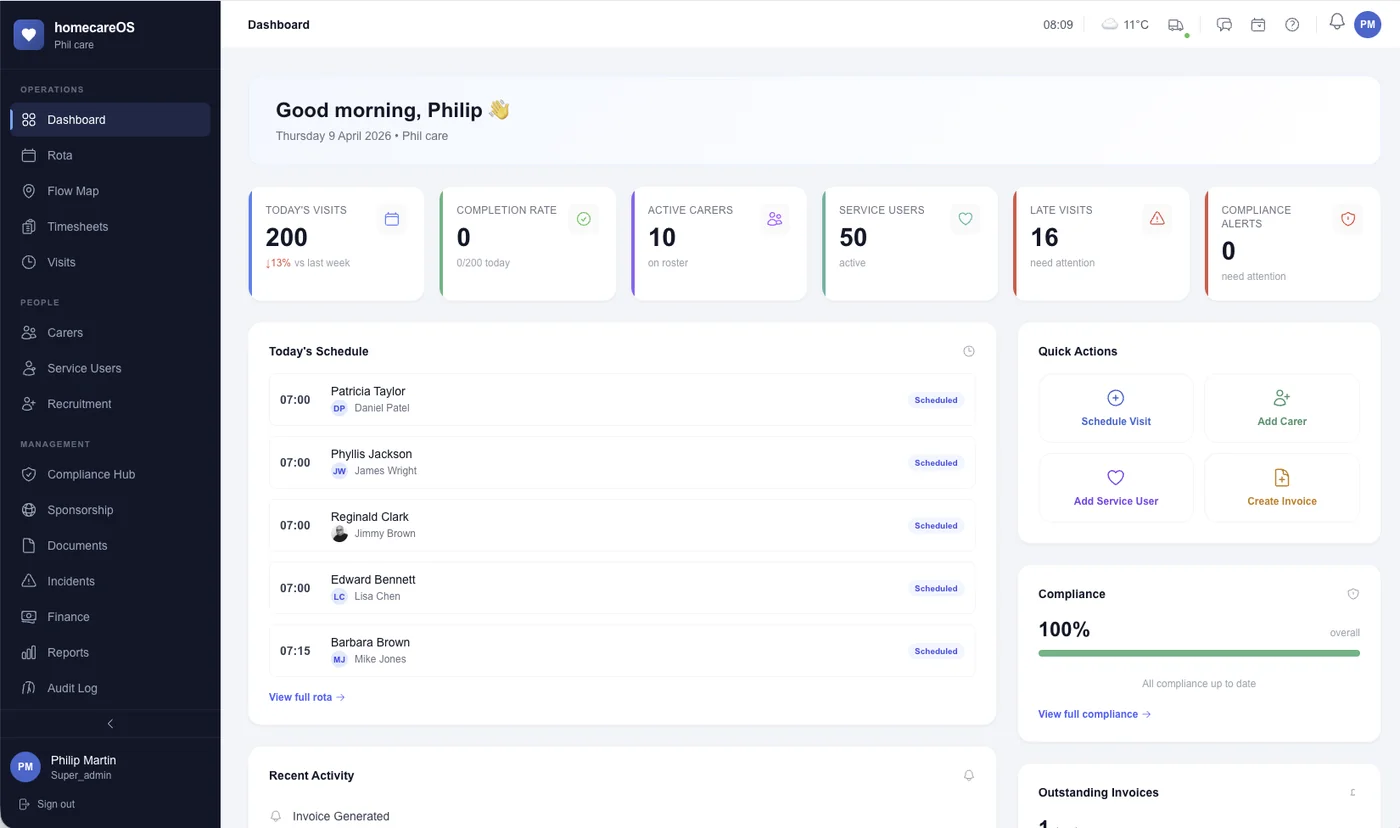
Your dashboard reads today's visits, completion rate, late visits and compliance alerts straight from live data every time you open it, no waiting for last month's numbers.
KPI tracking and trending
Track key performance indicators over time and spot trends before they become issues, or opportunities you might miss.
Medication coverage checks
See which scheduled doses have a visit to cover them, by client and by day, so a gap shows up before a round is missed.
Open the record behind a row
Where a report lists a person, their name links straight to their record, so you can go from care continuity, medication coverage, clock-in methods or the training matrix to the service user or carer behind the row.
Shareable links, and a permission per report
The date range you pick lives in the web address, so sending a colleague the link sends them the exact view you are looking at. What each person can open is set by their role and enforced on the server, so finance figures stay with finance and staff sickness stays with HR.
Exports a commissioner can check
The planned against delivered report prints as a PDF built to be sent to a council, showing the commissioned window and the clock times actually recorded on every row.
Visual charts and graphs (Recharts)
Beautiful, interactive charts bring your data to life. Bar charts, line graphs, pie charts and heat maps make patterns instantly visible.
Trends across any date range
Pick a preset such as last month, last quarter or this tax year, or set your own dates. Reports that track change over time then plot it week by week or month by month, so you can see which way the numbers are moving.
Fifteen reports, grouped the way you already think
Not a report builder and a blank page. Fifteen reports that already know what a home care agency gets asked for, in four groups. Most take a date range, and the range follows you from one report to the next rather than resetting each time. The rest, like compliance and the training matrix, show where you stand today, so there is no date to set.
Operations
- Operational. Visit completion, how close visits run to plan, and carer utilisation.
- Demand vs capacity. Visit hours against contracted carer hours, so recruitment is planned rather than reactive.
- Round efficiency. Travel time between calls, and what share of contact time it adds up to.
- Clock-in methods. GPS, QR and NFC tag setup, for each service user.
Care quality
- Incidents. Rate, severity and cause over time, and whether the service is genuinely getting better or worse.
- Care quality. Risk assessments, medication compliance, incidents and goals in one view.
- Outcomes and goals. Goal progress and achievement, by category.
- Care continuity. How consistent a team each person actually sees.
- Record completeness. What each service user record holds, and what is missing from it.
- Medication coverage. Which scheduled doses have a visit to cover them, by client and by day.
People
- Training matrix. Every course against every member of staff, and what is outstanding.
- Compliance. Background checks, right to work, training and supervision.
- Absence. Bradford Factor, sickness trends and leave.
Money
- Pay matrix. What every carer is paid an hour, and where that rate comes from.
- Revenue and pay. Revenue by payer, invoice aging and pay cost by role.
Every report exports to CSV. The incidents report also produces a Quality and Safety pack as a PDF.
A handful of causes explain most of your incidents
The incidents report sorts causes largest first and shows a running total beside each one, along with its share and how many were high or critical. Read down the running total and you can see how few causes account for most of your incidents, usually two or three rather than the whole list.
- Largest cause
- Inside the top eighty per cent
- The long tail
The chart above illustrates the idea. In the report itself it is a ranked table: cause, incidents, share, running total, and how many were high or critical.
How close your visits run to the time you planned
Every completed visit has a planned length and an actual one. This is the spread of the difference between the two, in minutes: how much each visit ran over or under the time it was given. It tells you something an average cannot, namely whether your call times are realistic or whether carers are quietly absorbing the gap.
- Within fifteen minutes of plan
- Running long, or finishing early
- Finished early
- Bang on the planned time
- Ran over
Horizontal axis: actual visit length minus planned visit length, in minutes.
A tail on the right is a call that needs more time on the rota. A tail on the left is a call that may not need the time it is billed for. Both are worth knowing before a commissioner asks.
Three ways to clock in, and a report on how every home is set up
Carers check in by GPS, by scanning a QR code in the home, or by tapping an NFC tag, with a manual override in the office when a time has to be put right. The clock-in report lists every home and whether it has a QR or NFC tag registered, so you can see which addresses are relying on GPS alone and which would be better with a tag on the wall.
- GPS
- QR code
- NFC tag
- Manual override
The chart shows the ways a visit time can be recorded, in illustrative proportions. The report itself counts homes: how many have an NFC tag registered, how many a QR code, and how many are on GPS alone.
The Power of Visibility
When you can see what's happening across your agency in real time, every decision gets better.
Our absence reporting is built on the Bradford Factor, a workforce measure with peer-reviewed backing as an early warning of repeat absence, reported honestly, including where the evidence is mixed.
See the evidence →Start Making Data-Driven Decisions
Book a personalised demo and see how homecareOS reporting gives you complete visibility into your agency's performance.
Compare homecareOS to your current software
See how we stack up against every major UK home care platform, feature by feature, transparent pricing, no fluff.