Care Rota and Scheduling Software for UK Home Care Agencies
Eliminate rota chaos. Give every coordinator a clear, visual command centre that turns hours of manual scheduling into minutes of confident decision-making, purpose-built for UK domiciliary agencies.
The Home Care Rota Where Nothing Drops Silently
The visual drag-and-drop rota gives coordinators complete control over every visit, every carer, and every hour of the day. See availability at a glance, move visits in seconds, and let the system handle the complexity of travel times, contract hours, and regulatory constraints, so you can focus on delivering outstanding care. Travel between visits gets its own tools too, see our route planning and mapping features. And if you're building your first schedule from scratch, our step-by-step guide on how to build a home care rota walks through the whole process.
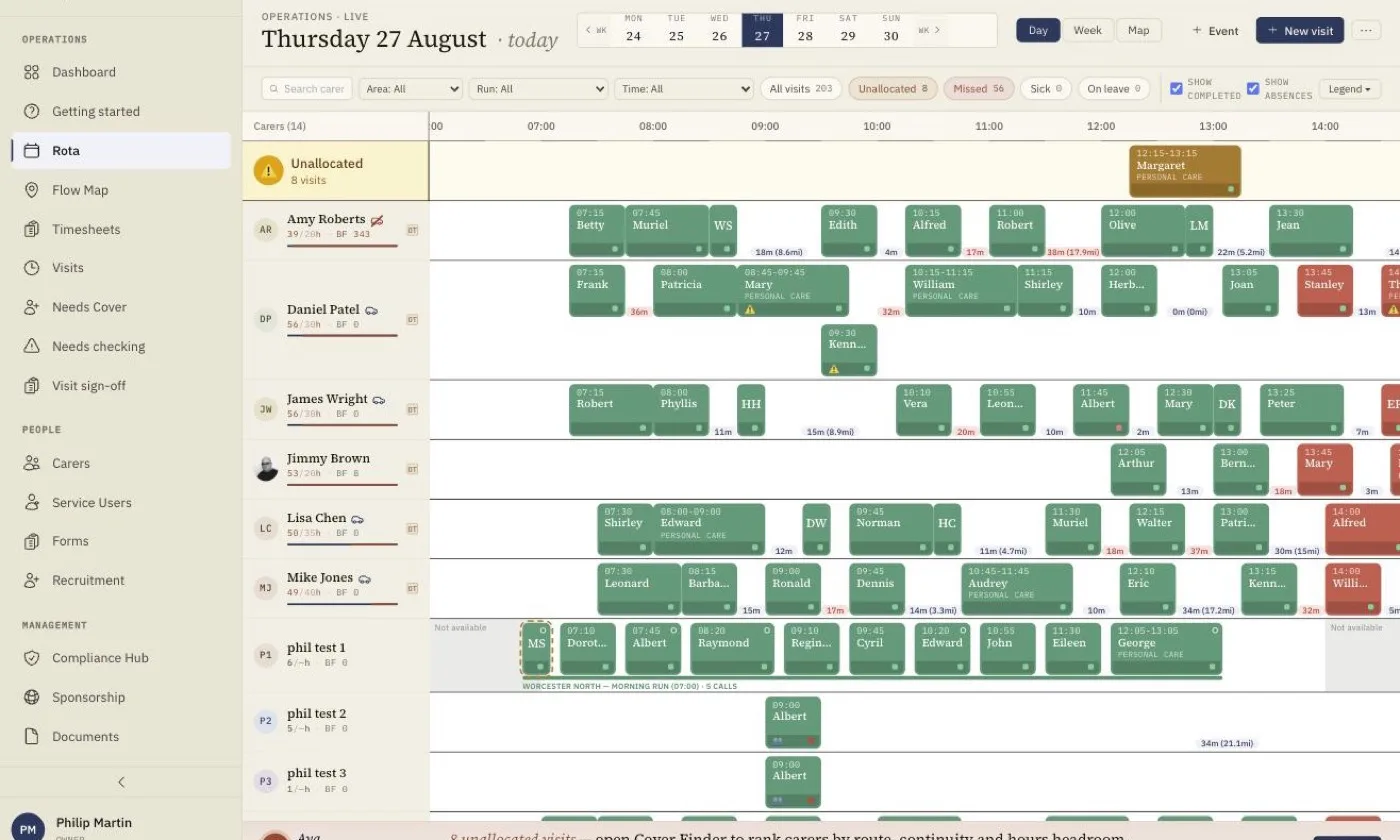
Colour-coded, so you can read the day at a glance
Every visit carries its status as a colour, so a coordinator can scan a whole week and see what is finished, what is running, what was missed and what still has nobody on it, without opening a single record.
Watch the fifth row. When a carer is recorded as off sick, homecareOS takes them off those calls the moment the absence is entered, rather than waiting for someone to notice. Their visits lift out of the row and into the unallocated lane along the top, keeping their place on the timeline so you can still see when they are due. That lane is the coordinator's worklist, and those calls are what the cover finder goes to work on.
Visit colours
- Scheduled
- In progress
- Completed
- Missed / late
- Cancelled
- Unallocated
- Sickness row
- Other absence
Marks on a visit
- Double-up, two carers
- Overlaps another visit
- Margin square: green above 25%, amber above 10%, red below
- Hollow dot: covering for the run's regular
- Run thread: the run's area colour, named below the row
- Outside the carer's usual availability
And the marks a single visit can carry
The colour tells you the state of a visit. These tell you the things about it that a colour cannot: that it needs two carers, that it collides with another call, that it is running at a loss, that the person attending is not the usual carer for that run, or that they are working outside the hours they normally give you.
The margin marker is deliberately a square rather than a dot, so it can never be mistaken for a status. It sits at green above twenty-five per cent, amber above ten, and red below that, turning a deeper red once a visit is actually losing money. Most rota software will not tell you that a call is unprofitable while you can still do something about it.
Then the Cover Finder Goes to Work
Tap a visit in the unallocated lane and the cover finder opens beside the rota. Everyone free at that time is ranked by continuity with the client, contract hours left and travel time, with a short line on each so you can see why. Anything worth weighing up, such as expired training or an overdue DBS update check, is flagged but never hides a carer. Carers who are already booked or absent are listed underneath, with the clash spelled out.
Assign the best fit and the visit drops into their row. An undo message confirms the change, so a wrong tap is one click from being put back.
Illustrative data. The office rota runs in the browser on a desktop or tablet.
Built for the morning the rota falls apart
Every feature is designed around the real daily pressures of running a home care rota, not generic project management.
See the consequence before you drop
Drag a visit and the grid shows you what you are about to do before you release it: the landing time, the gaps to the calls either side, and the travel it creates. No other UK rota shows the receipt before you commit.
Whole rounds, matched in one go
Save a round once. When you apply it, the system scores who can take the entire round on that day, not just the first call, so a run goes to a carer who can actually finish it.
Nothing waits to be noticed
Record an absence and every visit that carer held is freed by a database trigger and surfaces on the Needs Cover screen, a standing list of every unassigned visit ahead. Gaps announce themselves.
Cover ranked, with the reasoning
The cover finder scores every available carer on continuity with that person, headroom against their contract and journey time, and says so in words next to each name, so a coordinator can overrule it.
Travel times that admit what they are
Every leg between visits carries its confidence: measured from real routing, entered by hand, or estimated. A rota built on guessed travel is how carers end up sprinting, so ours tells you which numbers to trust.
Conflict Detection
Automatic alerts when you double-book a carer or schedule outside their availability, with each carer’s availability, overrides and Bradford Factor band shown right on their row of the grid.
Replay Any Day of Care, Visit by Visit
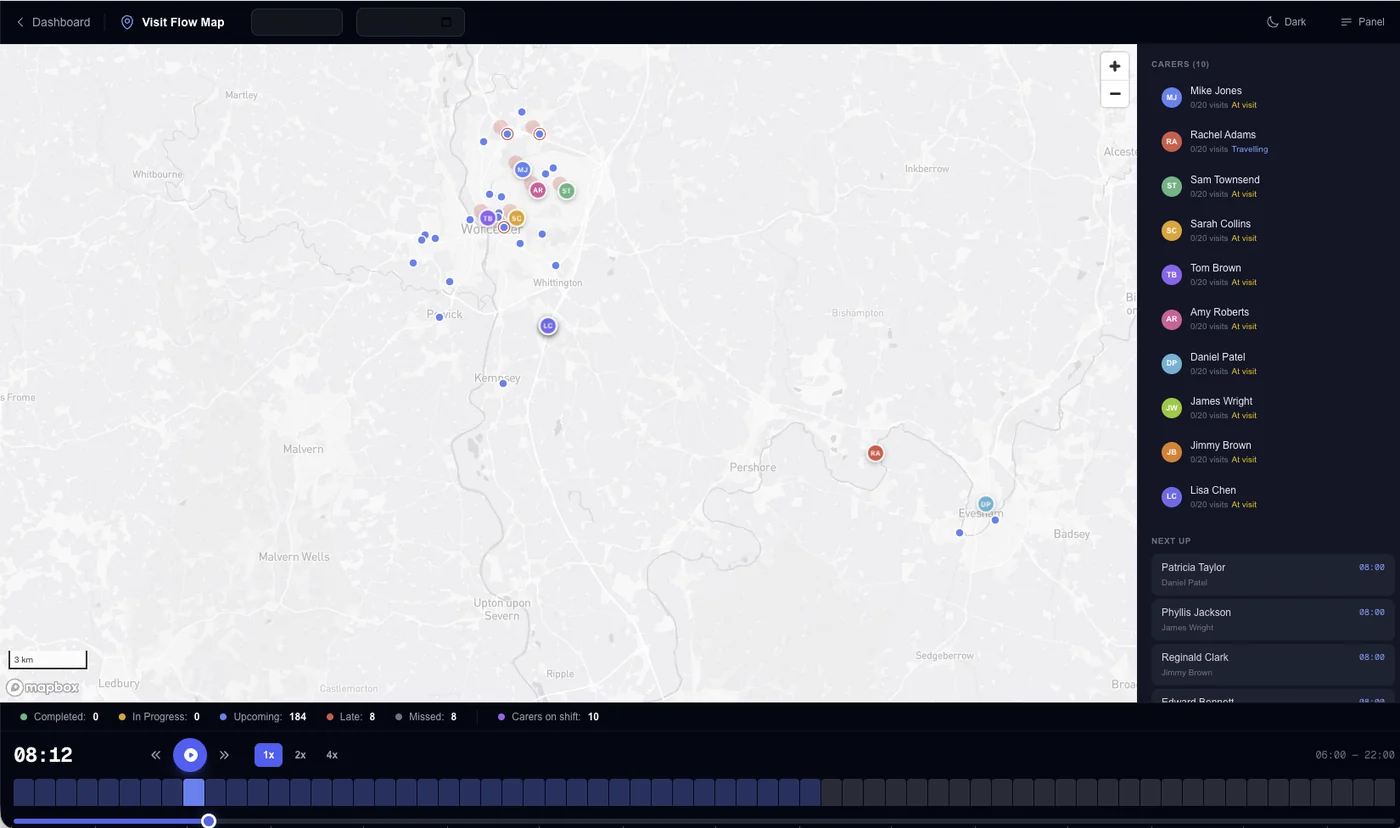
A full-screen time-lapse of any day: every visit appears on the map at its real time, so you can watch the whole operation compress into a minute. Use it to spot a round that zig-zags across town, show a commissioner what a day of care actually involves, or walk an inspector through the day something went wrong.
Run Builder: Save a Round Once, Reuse It Every Week
Run Builder sits at the centre of advanced scheduling and automation in homecareOS. Select a set of visits on the rota, click Save as Run, and that round is stored as a named template, for example "Monday AM - BN1 Round". Next time you need it, Apply Run asks for the template, a carer, a date and a start time, then creates every visit at its correct relative timing, assigns that carer as lead, and sends them a push notification so they know the work is theirs.
Applied runs behave like any other visits on the rota. Travel-time pills between consecutive visits, backed by Mapbox, show whether a round is genuinely drivable. The Plan view gives you drag-and-drop adjustment with an Unassigned row for anything still waiting on a carer. Copy week carries a settled week forward in one click. And when you want the whole week generated for you, the AI Rota Builder is the Pro step up. Run Builder itself is included on the free plan.
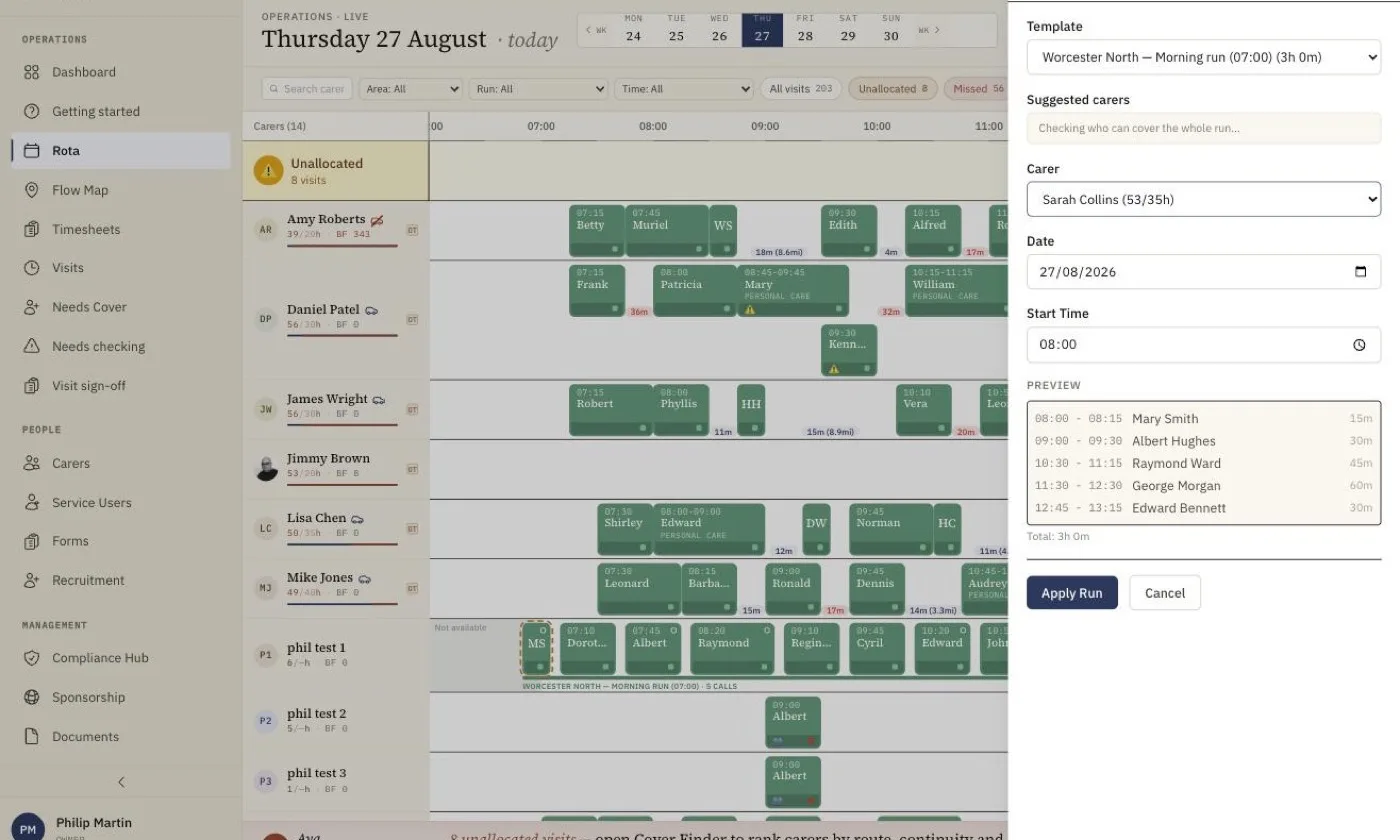
Care run scheduling lets a home care agency save a round of visits once and reuse it week after week, instead of rebuilding the same rota by hand every Monday. In homecareOS, a coordinator selects a set of visits on the rota and clicks Save as Run to store them as a named template, such as a Monday morning round covering one postcode area. When the round is needed again, Apply Run takes that template plus a carer, a date and a start time, then creates every visit at its correct relative timing, assigns the chosen carer as lead and sends them a push notification. Once applied, run visits are ordinary visits, so they flow through to GPS check-in, care records, pay and invoicing like everything else on the rota. That makes repeat rounds planning a one-click job rather than a weekly chore.
Everything You Need for Effortless Scheduling
From the drop receipt to GPS-verified check-ins, every detail is built for the coordinator who has to make the morning work.
The whole care day on one screen
One grid from 06:00 through to midnight with every carer and every visit on it, so the late bed calls sit on the timeline instead of falling off the end of the day.
Columns by the half hour, visits to the minute
The grid is ruled in 30-minute columns because that is how care is commissioned, but a visit sits at its real time. A 07:50 call shows as a 07:50 call.
Copy Week, without the duplicates
Carrying a settled week forward runs as a tracked background job with explicit conflict handling, so copying forward never silently doubles a visit that already existed.
Unallocated visit highlighting
Visits without an assigned carer stand out in dark orange so nothing slips through the cracks, even on the busiest days.
Multi-carer visits (double-ups, shadows)
Schedule two or more carers on the same visit with distinct roles (lead, support, shadow, or supervisor), all from one visit card.
Supervisor spot-check scheduling
Add a spot-check observation to any visit as its own attendee role, so supervision happens on real calls and leaves a record where an inspector will look for it.
GPS-verified check-in/check-out
Carers confirm arrival and departure with GPS location, giving you an accurate record for compliance, billing, and safeguarding.
Cancellations priced by their notice
Cancel from the rota and the system suggests the charge outcome your policy implies for that notice period: no charge, half, full or custom. The commercial consequence is decided at the moment it happens, not at invoicing.
Preferred carers on the record
Each service user’s preferred carers are held on their record and visible when you assign, and continuity, how often a carer has been to this person, carries the most weight in the cover ranking.
Holiday and sickness cover
Record leave or sickness and that carer’s visits are unassigned automatically and pushed to the Needs Cover list, with the cover finder one click away. Freeing a visit is reversible; a visit still showing an absent carer at 9am is not.
Patterns generate the weeks ahead
Set each call as a pattern, day of the week, time and duration, and future weeks generate from it. Change the pattern once and the change carries forward.
Two-week and alternating rota cycles
Build rotas that repeat over a two-week cycle, so alternating week A and week B patterns carry forward every time you extend the schedule instead of being rebuilt by hand.
Six daily call windows
Morning, lunch, afternoon, tea, bed and night windows, so each visit lands in the right part of the day, including overnight calls that cross midnight.
One visit, two carers, two services
A genuine 2:1 can carry a different service per attendee on the same visit, so a double-up bills and pays correctly for each carer instead of pretending to be two identical calls.
The Cost of Manual Scheduling
Every week without proper scheduling software, your agency leaks time, money, and morale. Here's what the numbers say.
Workforce figures: Skills for Care, The state of the adult social care sector and workforce in England, 2025, England, CQC-regulated non-residential services.
The scheduling engine tackles what operational-research literature calls the home health care routing and scheduling problem, the well-studied challenge of balancing travel, time windows and workload. Our rota builder scores every candidate assignment against those factors and shows its reasoning, and a coordinator makes the call.
See the evidence →Care Rota Software: Frequently Asked Questions
Cost, compliance, cover and switching, answered.
Run next week’s rota in homecareOS, free
Set up your agency in under fifteen minutes, load your patterns, and build a real week alongside your current system. Free for your first five carers, no card, no contract to exit.
Related Features
Compare homecareOS to your current software
See how we stack up against every major UK home care platform, feature by feature, transparent pricing, no fluff. If you are earlier in the search, our buyer's guide to home care software covers what to test beyond the rota, including regulator fit and pricing model.