Route planning for domiciliary care runs
Your rota is a map whether you look at it that way or not. See every visit and every carer on one map, plan runs that keep each carer's day in one area, and have check-in and check-out recorded with GPS on the carer app.
Every Carer, Every Visit, One Map
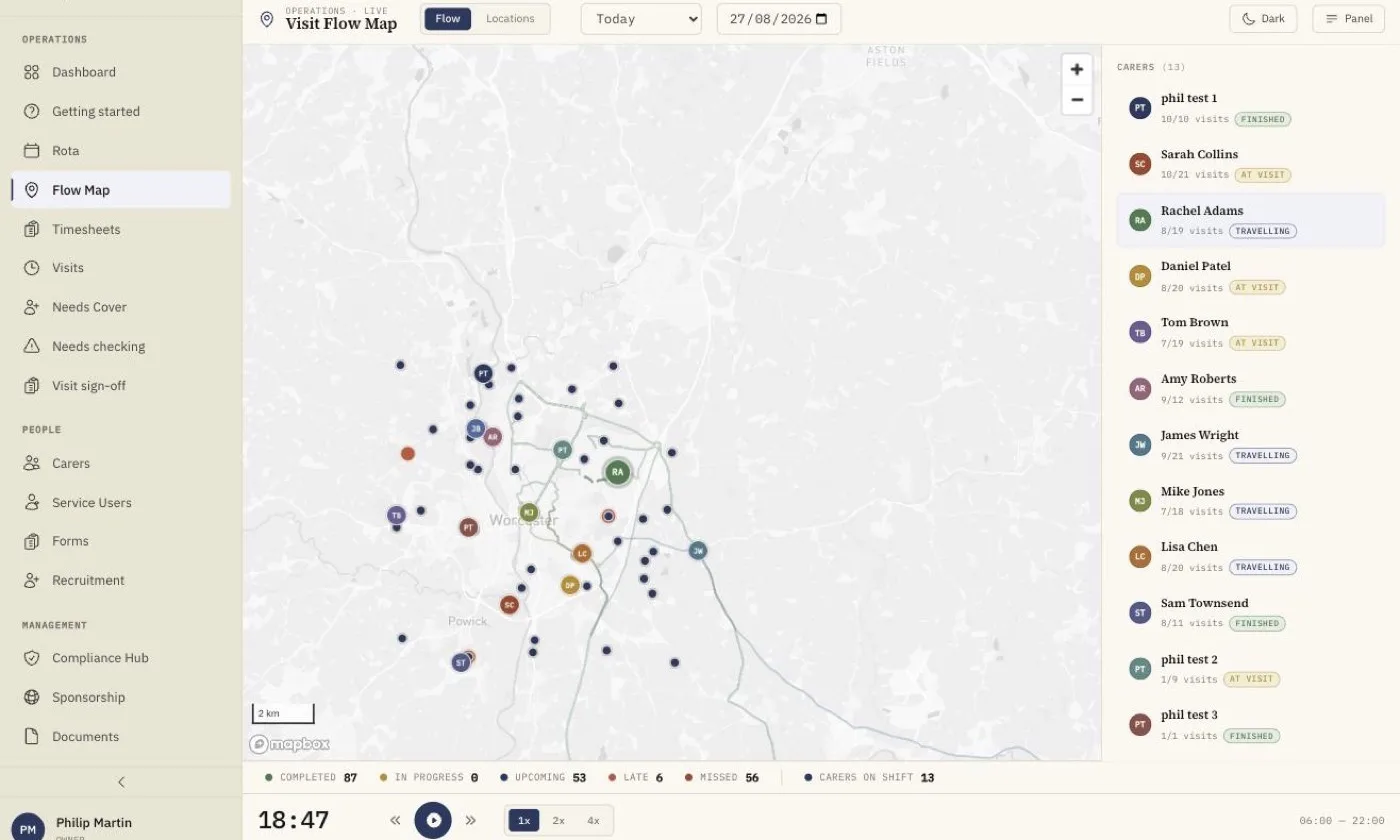
The Visit Flow Map plots every visit on an interactive map at its real address, with each visit's status driven by the actual check-in and check-out times. Play the day through and each carer's dot travels along real roads between their calls, drawn from their visits and clock times rather than from tracking anyone's phone. Late and missed calls stand out, travel patterns across your whole patch become obvious, and you can scrub back through the timeline to see how any day actually unfolded, all from one screen in the office.
From scattered visits to a protected run
Scattered visits become one suggested run. Each next stop is the nearest call that can still be reached in time, using measured drive times where we have them and a cautious estimate where we do not.
When a flood cuts a route, the office can hand a call to a nearer carer, with each candidate's drive time in front of them.*
* The animation shows the re-routing happening by itself. homecareOS does not do that: the decision is the coordinator's, made with measured drive times and a traffic panel that checks the journeys your carers drive most often and flags the ones running slower than usual.
Mapping software for domiciliary care companies plots every visit and every carer on a real map, so coordinators can plan runs geographically, cut travel time between visits and check that each call happened where it should. In homecareOS, the Visit Flow Map plots every visit at its real address and drives each visit's status from the actual check-in and check-out times, so you can see where each carer is due to be at any point in the day and play the whole day back. The rota factors actual travel times between consecutive visits, and when a carer checks in or out on the app their GPS location is recorded and compared with the service user's registered address, so anything out of range is flagged for the office to review. Run templates group recurring calls into rounds so carers spend more of the day caring and less of it driving between far-flung calls. Every mile between calls is time the agency pays for and the person receiving care does not get, and a rota planned without travel in it hides that cost rather than removing it. Because the map, the rota and the care record sit in one platform, a late call raises an alert at the threshold you set, and cover suggestions already account for how far each available carer must travel.
Why Coordinators Plan on the Map
Travel is the hidden line on every domiciliary care rota. These tools make it visible, plannable and provable. Still drawing up a shortlist? Our guide to UK home care software compares 16 platforms on price and regulator fit.
Visit Flow Map
Follow the whole day on a real map. Every visit plotted at its address, status driven by real check-in and check-out times, and a timeline you can scrub through.
Travel Time Between Visits
The rota factors actual travel times between calls, so carers aren't rushed and service users aren't kept waiting.
Geographic Run Planning
Run templates group visits into recurring rounds, so each carer's day stays in one area instead of criss-crossing town.
GPS Check-In and Check-Out
Carers confirm arrival and departure with one tap on the mobile app, with GPS recorded, giving you evidence for compliance, billing and safeguarding.
Spot Late Arrivals Instantly
Late and missed visits stand out on the rota and raise an alert at the thresholds you set, so you act before the family calls.
Distance-Aware Cover
The cover finder weighs drive time alongside continuity and hours headroom, so distance counts in the ranking rather than being an afterthought.
Plan the Day Around Real Journeys
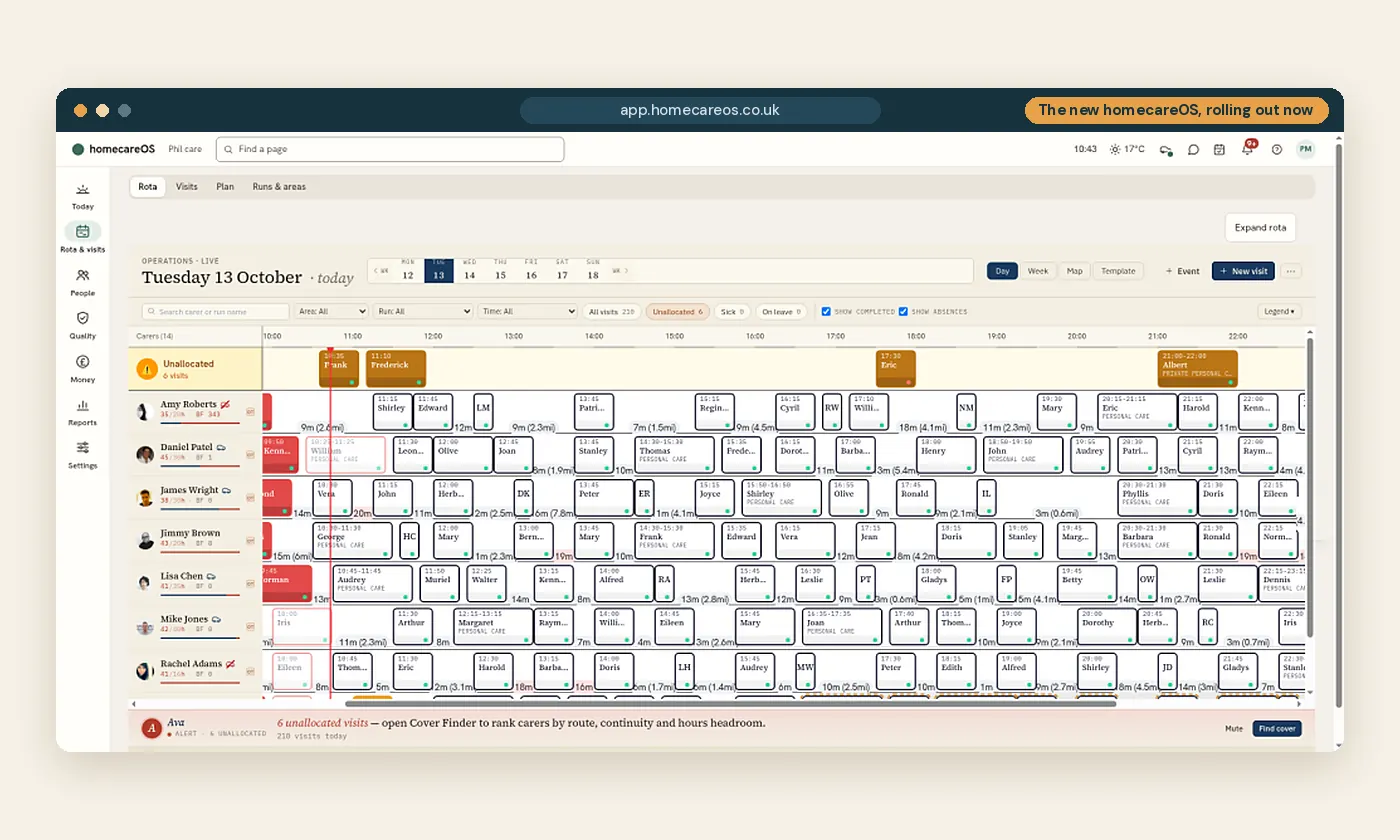
The drag-and-drop rota shows every carer, every visit and every travel gap on one screen. Because travel time sits inside the schedule rather than in a coordinator's head, you can see at a glance when a run is too tight, and the AI rota builder schedules around availability, preferences, qualifications and travel when it drafts the week for you.
Mapping and Travel Tools, End to End
From planning runs on the map to proving each visit happened, geography runs through the whole platform.
Interactive Visit Flow Map
Every carer and every visit plotted on a real map, with visit status from real check-ins visible at a glance and a timeline you can play back.
Timeline scrubbing
Replay any day on the map. Scrub back through the timeline to see how visits actually unfolded, useful for reviews and queries.
Travel time between consecutive visits
Measured drive times sit on the rota between one call and the next, and a gap too short for the journey turns red while you build the round, so it is caught before the rota goes out.
Run templates for recurring rounds
Group a round's recurring calls once and every week's visits carry the run. Assign a carer to the whole round in one go, or drop a saved round onto a single day from the rota, keeping the same carers on the same geographic runs for continuity and shorter journeys.
Suggested runs from a day's visits
Ask homecareOS to propose rounds out of the calls that belong to no run yet. It groups them by time of day and chains each next stop to the nearest call that can still be reached in time, then tells you how much of that chain's travel is measured and how much is estimated. Nothing is saved until you say so.
GPS check-in and check-out, distance checked
One tap on the carer app records arrival and departure with GPS and compares it with the registered address, flagging anything more than 150m out for the office to review. NFC tags and QR codes work the same way, and a carer with no signal is never locked out.
Late and missed visit visibility
Overdue visits pulse red on the rota and stand out on the map, so the office spots a problem before it becomes a complaint.
Distance-weighted cover suggestions
When a carer calls in sick, the cover finder ranks available carers on a combined score of continuity, drive time and hours headroom, and shows each one's journey time, how often they have been to that client and how much headroom is left, so a familiar carer can come out above a slightly closer one.
Carer day view, offline
On the mobile app, carers see their whole day at a glance: every visit, the times, the address and the service user details they need, and it still works with no signal.
What Geography-Blind Scheduling Costs
When the rota ignores the map, the losses land on mileage, missed windows and morale.
Balancing travel, time windows and workload is what operational-research literature calls the home health care routing and scheduling problem, a well-studied challenge that the homecareOS scheduling engine is built around.
See the evidence →Domiciliary Care Mapping: Frequently Asked Questions
Maps, travel time, GPS check-in and cost, answered.
See Your Patch on One Map
Book a personalised demo and watch the Visit Flow Map, travel-aware rota and GPS check-in working with a real day's visits.
Compare homecareOS to your current software
See how we stack up against every major UK home care platform, feature by feature, transparent pricing, no fluff.