Every home care agency in the UK has to check that a new care worker is allowed to work in the UK before they start. The check itself takes minutes. What catches agencies out is the detail around it: using a method the Home Office accepts, doing it before the first visit rather than in the first week, copying the right pages, and remembering the follow-up check when someone's permission runs out.
This guide is for registered managers and recruitment leads. It is based on GOV.UK's page on checking a job applicant's right to work and the Home Office employer's guide to right to work checks, last updated on 1 October 2026. It is not legal advice. If a case does not fit the guide, ask the Home Office before the person starts.
It sits alongside our care worker recruitment checklist, the guide to DBS checks for care workers and, if you sponsor overseas staff, sponsor licence compliance for home care agencies.
Why the check matters to a care agency
The check gives you what the Home Office calls a statutory excuse. If a carer later turns out not to have the right to work, but you did the prescribed check before they started, and any follow-up checks on time, you have a defence against a civil penalty.
Without it, the stakes are high. GOV.UK's page on penalties for employing illegal workers says an employer can face a civil penalty of up to £60,000 for each illegal worker, and that the business's details may be published. Knowingly employing someone without the right to work, or having reasonable cause to believe they do not have it, is a criminal offence with up to 5 years in prison and an unlimited fine. The employer's guide also notes that a civil penalty could affect your ability to sponsor workers, which matters to any agency that recruits through a sponsor licence.
There is a CQC angle too, but it is easy to overstate. Regulation 19 is about fit and proper persons, and Schedule 3 lists the information you must have for each person employed, starting with proof of identity including a recent photograph. Schedule 3 does not mention right to work by name. The right to work check is a separate duty under immigration law. In practice, inspectors and Home Office officers both expect to find a tidy staff file, so most agencies keep the two together.
The three accepted ways to check
The employer's guide says you must do one of three checks before the worker starts:
- A manual check of original documents.
- A Home Office online check, using the applicant's share code and date of birth.
- A check through a certified digital verification service provider, which the guide calls a RtW DVSP.
Which one you use depends on the person's nationality and the type of permission they hold. The guide is clear that you cannot insist on one method for everyone. You should give each applicant a reasonable opportunity to prove their right to work, and you must not treat anyone less favourably because of where they are from.
Manual check of original documents
This is the route for British and Irish citizens who bring a passport or other document on the acceptable lists. GOV.UK sets out the steps:
- Ask to see the original documents. A scan, photo or screenshot is not enough.
- Check them with the applicant present.
- Check the documents are genuine, unchanged and belong to the person in front of you. Photos should match the person and each other, and dates of birth should match across documents.
- If names differ, ask for the document that explains why, such as a marriage certificate.
- Make a clear copy that cannot be changed. For a passport, copy any page with the expiry date and the person's details, including the photograph and any endorsement. Copy other documents in full.
- Record the date you made the check.
GOV.UK also says you can no longer accept biometric residence cards or permits. If an applicant offers one, ask for a share code instead.
Home Office online check
Most people who are not British or Irish now hold an eVisa, and the employer's guide says people with an eVisa can only prove their right to work through the Home Office online service. The applicant gets a share code from GOV.UK and gives it to you. You then use the share code checking service with their date of birth.
When the result comes back, read it properly. It tells you whether the person can do the type of work you are offering, whether there is a limit on hours, and when their permission ends. Check that the photograph on the result is the person you are hiring. Then save a PDF or HTML copy of the profile page, with the date of the check.
Certified digital verification service
A certified provider can carry out digital checks on valid British or Irish passports, or Irish passport cards, including some up to 6 months past their expiry date. Some offer facial matching to confirm the person is who they say they are. The guide is firm on one point: the agency, not the provider, remains responsible for making sure the check was done as prescribed. If the person does not have a suitable passport, or does not want a digital check, you must offer a manual check instead.
Check the person, not just the document
The October 2026 guide puts more weight on making sure the person you checked is the person who turns up to work. It asks employers to take reasonable and proportionate steps to rule out impersonation, and gives examples from keeping a photograph of the person checked, for comparison later, to facial recognition through a certified provider.
In home care this has a practical edge. The person who did the interview should be the person who arrives for shadow shifts and then for the first solo visit. A photograph on the carer record, checked by the field supervisor at the first shadow shift, is a simple control.
When you must ask the Home Office
Some applicants cannot prove their right to work themselves. The usual reason is that they have an outstanding application, review or appeal with the Home Office, made before their previous permission ran out. In those cases, and a few others listed on GOV.UK, you ask the Employer Checking Service to confirm their status.
If the answer is positive, the Home Office sends a Positive Verification Notice. Keep it. GOV.UK says it gives you a statutory excuse for 6 months, and the employer's guide says you must do a follow-up check before that 6 months ends.
Follow-up checks
If a carer's permission to work has an end date, you must check again on or before that date if you intend to keep employing them. The follow-up does not have to use the same method as the first check.
There is no follow-up needed if the first check showed the person has settled status or status under the EU Settlement Scheme.
If a carer cannot show continued permission on the day, it does not automatically mean they have lost it. They may have an in-time application waiting for a decision, or a technical problem with their share code. The guide asks employers to give a reasonable opportunity to prove continued permission, and points to the Employer Checking Service and the UKVI Resolution Centre on 0300 790 6268 for help.
For an agency, the risk is simply forgetting. A carer hired two years ago on time-limited permission can drift past their end date while their rota carries on as normal. Put the follow-up date on the carer record the day you do the first check.
Hours limits, students and second jobs
A right to work check is also a check on what work and how much. The result may limit the hours someone can work, and you are expected to stay within it.
- Students. If a student has limited permission to work in term time, the employer's guide says you must get, copy and keep their academic term and vacation dates, provided by their education provider, for the period you employ them. The rota then has to respect the term-time limit.
- Sponsored workers taking a second job. Some sponsored workers can do supplementary work for another employer. The guide says it must not exceed 20 hours a week in total and must not take place during their contracted hours for their sponsor. It suggests asking for a letter from the sponsor confirming they still work there and their contracted hours. If you later become aware someone is working in breach and you keep employing them, you lose your statutory excuse.
Sponsored staff you employ yourself bring their own duties. Our guide to sponsor licence compliance covers those.
Self-employed carers and subcontracted work
The October 2026 guide reflects changes made by the Border Security, Asylum and Immigration Act 2025. The scheme now reaches beyond traditional employment. The guide says it applies to people engaged under a worker's contract, individual sub-contractors and online matching services, not only employees.
It also introduces extended liability. Where you are contracted to provide services and you use another business to supply the people, or where a contract lets a worker send someone else in their place, you may be treated as employing whoever actually does the work.
If your agency uses self-employed carers, takes on subcontracted packages, or passes visits to another provider, read the extended liability section of the employer's guide and take advice. It is a significant change from the older rules.
What to keep on file
For each carer, keep:
- a clear copy of each document checked, or the online check result, or the provider's output
- the date the check was made
- any Positive Verification Notice from the Employer Checking Service
- term dates for students with term-time limits
- the date of any follow-up check due, and evidence it was done
GOV.UK says to keep these for the whole time the person works for you and for 2 years after they leave, and to follow data protection law. Then dispose of them securely.
A simple process for a home care agency
- Tell applicants early what they will need, including that people with an eVisa will need a share code.
- Do the check before the person starts work for you, which usually means before their first shadow shift.
- Use the right method for the person, and offer an alternative if they cannot use the first one.
- Record the result, the date and any hours or work limits on the carer record.
- Set the follow-up date before the carer goes on the rota.
- Check that the person at the first shadow shift is the person you checked.
How HomecareOS helps
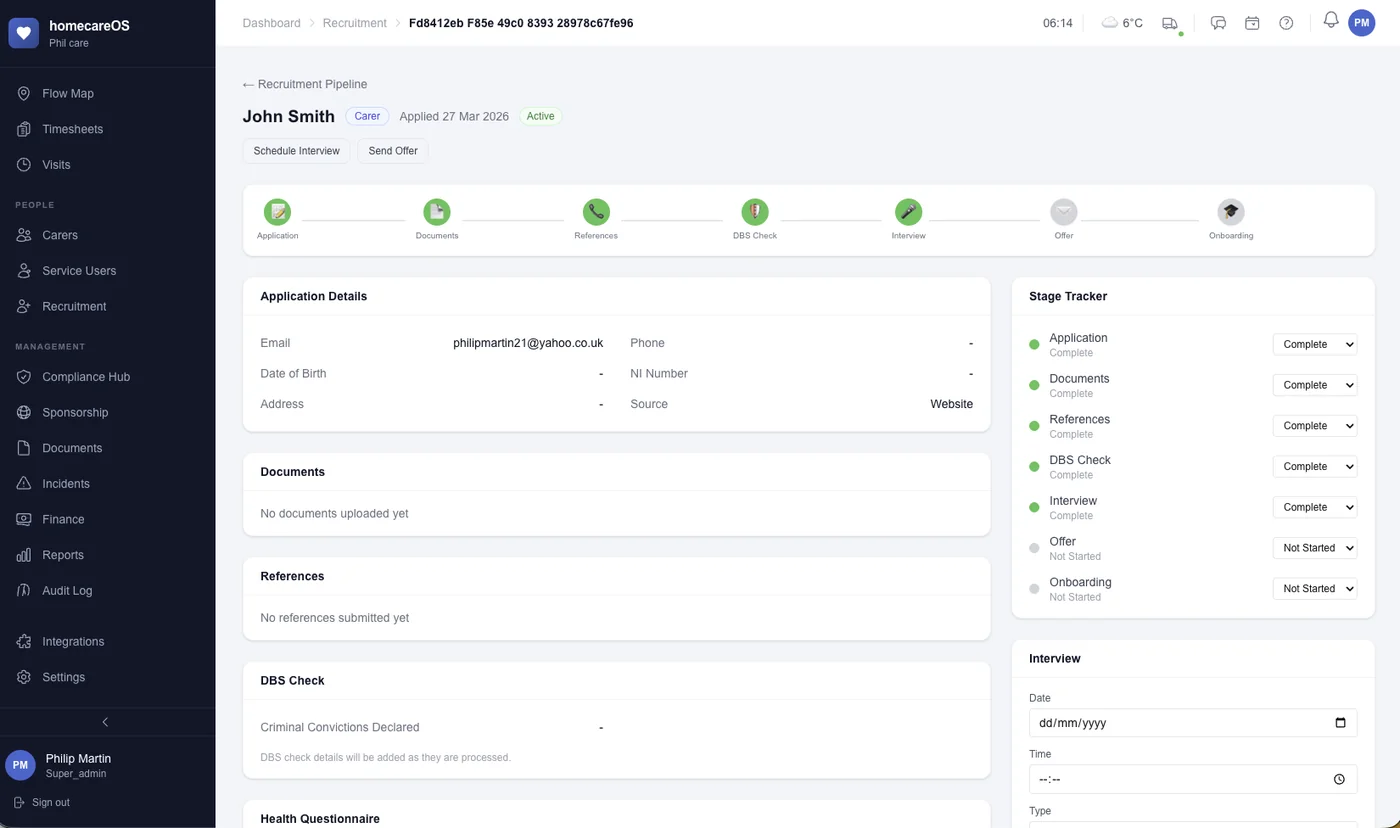
The HomecareOS recruitment portal brings the paperwork forward, so it is ready before the offer:
- The agency invites an applicant by email.
- The applicant completes an online /apply portal with their application, documents, right to work details, two references, DBS details and a health questionnaire.
- The office tracks each applicant through seven stages: application, documents, references, DBS, interview, offer and onboarding.
- When you hire, the applicant is converted into a carer record, ready for you to add to the rota.
See how those stages work in our care recruitment software, where right to work, DBS and references stay on one applicant until hire.
HomecareOS does not carry out the Home Office check for you. You still view the share code result or check the original documents yourself, and record the date. What changes is that the details arrive in one place, and you are not chasing them on the morning of the first visit.
The portal is £49 a month. See the recruitment portal, book a demo, or call Phil on 01905 674704.
Sources
- Checking a job applicant's right to work, GOV.UK. Methods, what to check, copies, retention and the Employer Checking Service.
- Right to work checks: an employer's guide, UK Visas and Immigration and Immigration Enforcement, updated 1 October 2026. Statutory excuse, digital verification providers, impersonation, follow-up checks, students, supplementary employment and extended liability.
- Right to work checks: employer guidance collection, GOV.UK.
- Check a job applicant's right to work: use their share code, GOV.UK.
- Prove your right to work to an employer, GOV.UK, the applicant's side of the share code.
- Penalties for employing illegal workers, GOV.UK.
- Regulation 19, CQC, and Schedule 3 of the Health and Social Care Act 2008 (Regulated Activities) Regulations 2014.