Rolling out These steps use the new HomecareOS screens, which are being switched on agency by agency. If your screens look different, call us on 01905 674704 and we will walk you through it.
Before you start
- Open Rota & visits in the menu, then the Rota tab.
Steps
Choose the day
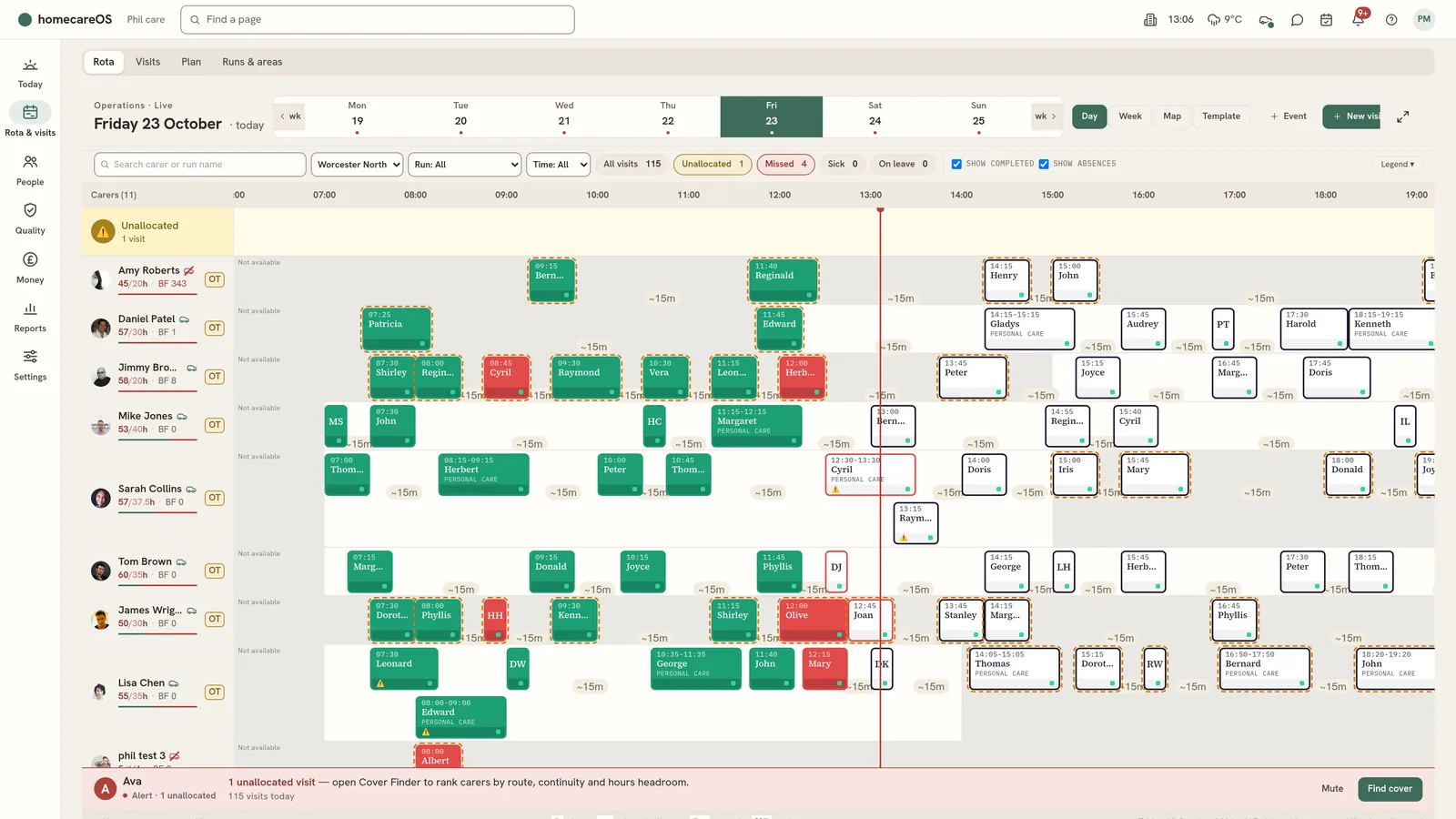
The day you are looking at. Choose Yesterday, Today or Tomorrow, use the arrows to step a day (a week in Week view), or the calendar for any date.
Choose the view
Day shows one day by the hour. Week shows seven days. Map shows where the visits are. Template shows the repeating weekly pattern, which is a plan with no status.
Narrow it down
Search finds a carer or a run. Area, Run and Time narrow the rota. The counts (All visits, Unallocated, Missed, Sick, On leave) filter to those when chosen.
Read a carer's row
The carer's name and hours booked this week against their contract (31/37h), with a bar. Underneath: today's care, time on the road and waiting. S is off sick, L on leave, A another absence, OT over contract, and the car means they drive.
Read a visit
One planned visit: its time and the person. The frame is the plan; the solid bar above it is when the carer actually clocked in and out, so a short or late visit shows at a glance. The colour says where the visit is up to. See the colour key below.
Read the marks
+35 is minutes late, 72% is a short visit, ×2 is a double-up (1 of 2 means it still needs a second carer). A dashed amber edge means the visit overlaps another of this carer's visits.
Read the travel
Under each carer's visits: the drive between them in minutes, then a dotted line for waiting. Red hatching means the drive runs into the next visit's start.
Check Unallocated
Visits nobody is booked on yet. They need cover: drag one onto a carer, or right-click it and choose Find cover.
Check hours per hour
Care booked in each hour against the carers who can work it, with how many hours spare or short underneath. Navy is covered, dark orange has no carer yet.
Open a visit
Hover a visit for its times and counts of tasks, medication, observations and notes. Click it to open the full visit card beside the rota: what was planned, what is happening and what happened, with Correct times, Cancel visit and Reassign. Legend opens the key to every colour and mark on the rota.
Good to know
- Still to come: booked with a carer and not started yet.
- On a visit: a carer has clocked in and is there now.
- Delivered: the carer has clocked out. The visit is done.
- Late: the start time has passed and nobody has clocked in yet.
- Missed: nobody clocked in within 45 minutes of the start (your agency can change this), or it was marked missed.
- No carer: nobody is booked on it. It sits on the Unallocated row.
- Cancelled: cancelled with a reason. It stays on the rota, struck through, for the record.
- Sick, Annual leave, Other absence: a band across the carer's row. Marking someone sick today moves their visits to Unallocated for cover.
- To reassign or move, drag a visit to another carer's row, or along the row to a new time. HomecareOS checks for clashes first, and Ctrl+Z undoes it.
- Right-click a visit for Edit, Find cover, Reassign, Unassign, Mark as cancelled (with a reason and any charge) or Delete. Right-click a carer to mark them sick today, add an event or open their profile. On a tablet, tap a visit for Open visit, Edit, Reassign or Cancel.
- Event books a carer for training, supervision, a meeting and the like. New visit adds a one-off visit. ⋯ holds Copy week and Apply run, which create visits in bulk.
Was this helpful?
Thank you. Glad it helped.
Sorry about that. Tell us what was missing and we will improve this guide.