Rolling out These steps use the new HomecareOS screens, which are being switched on agency by agency. If your screens look different, call us on 01905 674704 and we will walk you through it.
Before you start
- The chart needs a role that can see medicines. Changing medicines needs a role that can edit them.
Steps
Open the person's record
Go to People and open the person.
Choose Clinical, then Chart
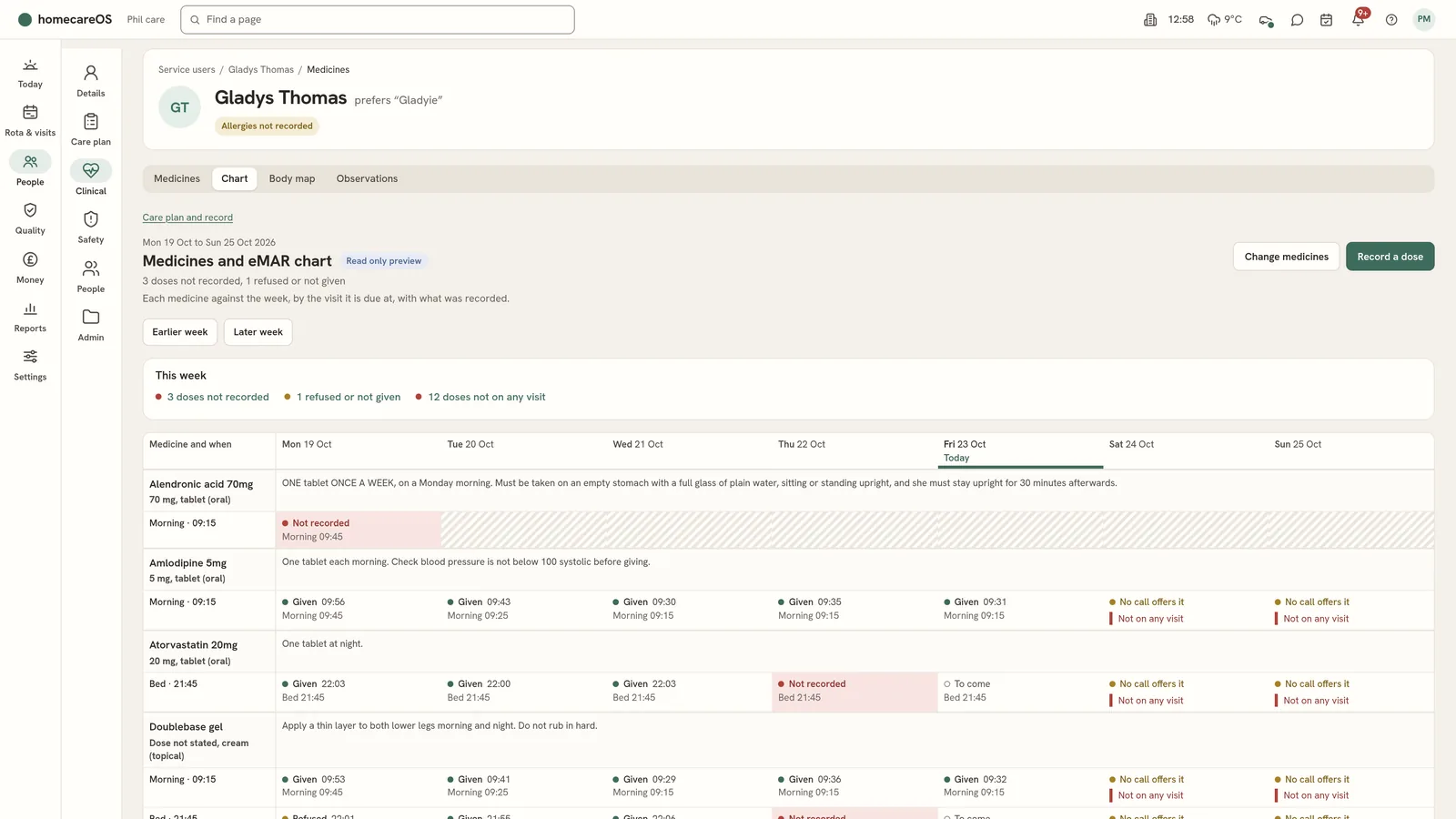
The tabs are Medicines, Chart, Body map and Observations. The chart's top line says the most important things this week.
Read This week
The summary lists, where there are any: doses not recorded, doses refused or not given, doses recorded twice, doses shown twice in the carer app, doses not on any visit, and records that match no round. Each opens the chart.
Choose the week
Use Earlier week, This week and Later week. On a phone the chart shows one day at a time.
Read each medicine
Each medicine shows its rounds, by the call and time it is due, then each day of the week. Green is given or self administered. Amber is refused, withheld, not available or another reason it was not given. Red is not recorded: every call that offers it has finished and nothing is recorded.
Open a record
A record shows the round, the dose, the call, who recorded it and when, any witness, and the reason or notes. For an as-needed (PRN) dose it shows why it was needed.
Check where the carer app goes wrong
Not on any visit (No call offers it) means no call that day offers the dose, so the carer app does not show it. Shown twice means a long, live-in or night call offers the same dose at two calls. Shown at every call means the medicine has no time set.
Change medicines
Choose Change medicines. Add a medicine with its name, dose, kind (regular at set calls, as needed, or once only), when it repeats, prescriber and start date, and mark it controlled or high risk. Change a medicine, or Discontinue it with a reason. Imported medicines wait until you Start it.
Record a dose or print
Record a dose and printing the MAR open the full medicines page.
Good to know
- Nothing is deleted. A discontinued medicine stays on the record with its reason, and MAR records are never changed.
- A dose given but not recorded, for example because the phone was offline, can be recorded afterwards on the visit card: Corrections > A missed dose, with the time it was given and why.
- A dose given after midnight on a night call counts on the next day, and its record says so.
- A dose given against a safety rule is kept, flagged and the office is alerted.
Was this helpful?
Thank you. Glad it helped.
Sorry about that. Tell us what was missing and we will improve this guide.